Pages

Showing posts with label Comics Production. Show all posts

Thursday, June 9, 2022

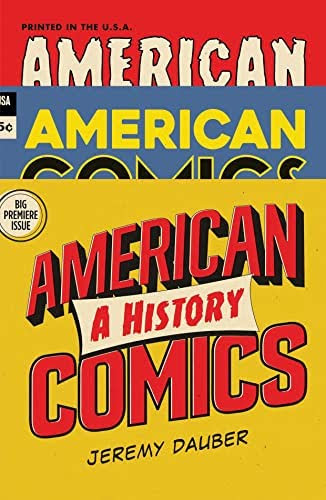
REVIEWS: American Comics: A History

I’ve always enjoyed reading history books and scholarly work about comics—American Comics: A History by Jeremy Dauber, is the latest such entry. Though I’m pretty familiar with the history of American comics, this book offers an ambitious and very readable narrative overview of comics from its beginnings to the present day. I particularly found fascinating the quantitative information that showed that, up until the 1950s or so, adults and women still made up a significant portion of comics readers, contrary to the belief that comics have always been a “children’s” medium. 

Towards the end of the book, however, the book loses some of its narrative steam when it turns into a laundry list of comics and trends, as comics become more fragmented and diverse with the explosion of new outlets and platforms that encompass alternative comics, manga, graphic novels, and the YA and book market. With the current era of comics still evolving, no doubt it was a challenge coming up with a compelling way to cover the recent expanding comics scene in a way that made thematic and narrative sense—something for future scholars to tackle. (The book nevertheless piqued my interest in some comics I wasn’t aware of previously.) Nevertheless, the book provides a great overview of the history and breadth of comics in the U.S.

Sunday, March 20, 2022

Cutting the Adobe Cord

For several years, I’ve looked for viable substitutes to the Adobe Creative Adobe Suite (Adobe CS) of products, particularly Photoshop, Illustrator, InDesign, and Dreamweaver. These graphic design applications are industry standards but were discontinued as standalone desktop applications in 2013 in favor of a monthly cloud subscription model. Like many other users, I’ve not migrated to the online Adobe application to avoid the monthly premium subscription fee; however, as a result, I also have not upgraded my iMac operating system since the discontinued Adobe CS does not work on newer operating systems (I stopped updating with MacOS Sierra.)

These Adobe applications have been essential to my comics work: Illustrator for lettering; Photoshop for coloring, zipatone graytone/dot patterns, corrections, and assembling and saving the final pages in digital form (i.e., TIF files); InDesign for print projects like flyers and the text pages of my publications; and Dreamweaver for my website.

Knowing my days with these applications were numbered, in recent years I intermittently explored potential alternatives, including open source software like Gimp (for Photoshop) and Ink (for InDesign). Initially, none seemed ready for prime time or as robust as Adobe’s products…that is, until late last year, when I finally came across programs that fit the bill and, nearly as importantly, allowed me to access older files created with Adobe.

I’ve now nearly fully migrated to the following applications:

Clip Studio Paint (CSP)

I purchased an earlier iteration of this software application years ago for my daughter, when it was known as Manga Studio 5. Over the years, it obviously has become more robust, but for some reason, probably because of its initial manga focus, I never seriously considered it an option. So while exploring other graphics programs, on a lark, I downloaded the trial version. The more I played with it and learned its features, however, I was quickly won over.

CSP is a fairly full-featured program geared towards comics professionals and artists, combining together functions for which I traditionally used Photoshop and Illustrator, such as coloring, dot shading, post-production corrections and lettering. I feared the learning curve was going to be a lot steeper, but felt fairly comfortable and proficient within a few days. It helped that I decided to jump into it feet first with a whole new issue of Rob Hanes Adventures. I also had to color some commissions in full color and used it for these jobs. 

Among its advantages, CSP has a more direct way of applying classic dot patterns and the ability to directly apply special effects (both built in and as add-ons). With Photoshop, I often had multiple files for a single project (or comics page) that was later saved into a master document, so that I could easily go back and make changes; this was on top of a separate lettering layer created in Illustrator. Now, I pretty much can do it all within a single file with Clip Studio Paint!


Affinity
During my research, I also discovered a U.K. company called Affinity that offers three applications that are clearly intended to be affordable alternatives to Photoshop, Illustrator and InDesign: respectively, Photo, Designer and Publisher.

They are very reminiscent of the early editions of Photoshop, Illustrator and InDesign when they were standalone programs. But they nevertheless have their own little quirks and approaches, which can be occasionally frustrating and non-intuitive. So thank goodness for YouTube (which also has been helpful in learning Clip Studio Paint).

Better yet, I discovered that Photo preserved all my layers of my old Photoshop files, which was the tipping point, and a priority for me. Strangely, this was not the case with the trial version of the application, which was an initial concern and possible deal breaker; but when I purchased and downloaded the full version, discovering this capability was an incredibly happy surprise.

A minor tick is that Clip Studio Paint for some reason does not like TIFF or EPS files created within Affinity, so the two programs don’t play well together. Fortunately, a workaround is to save the file as a PNG instead, which can then be imported into Clip Studio Paint.

I also subsequently learned that Publisher can't open older InDesign files. This is not as high a priority and something I can live with. 

That said, although Photo still comes in handy for other types of projects and for opening old files—as does Designer for more customized lettering that CSP can’t handle—CSP is now my primary comics post production tool.

Bonus Workaround Programs

BlueGriffon

My WCG Comics website was built from the ground up, using Adobe CS's Dreamweaver, a web design editor that allows for both WYSIWYG and html code editing. After downloading and playing with trial versions of other software, I found BlueGriffon to be a pretty good alternative. Though not quite as comprehensive as Dreamweaver, and also a bit quirky and clunky, it nevertheless has a similar feel and features, and it enables me to edit and tweak pages as needed. 

That said, I’m not sure the software is as conducive as Dreamweaver in building a website from scratch. But for now, I simply need a program to help maintain my current site, so I’ll cross that bridge later. (I last gave my website a major design overhaul in 2017.)

UPDATE (July 2022): Researching this application more, I subsequently learned that it has not been updated since 2019 and, worse, also likely would not work on newer iMac operating systems. I've since migrated my entire site to WordPress.

LibreOffice

Though I’ve moved most of my writing and spreadsheets to GoogleDocs, like many people, I am a longtime Microsoft Word user and occasionally still need a dedicated word processor for writing and opening old documents. (GoogleDocs also can't access the fonts on my computer, which is an occasional need of mine on some projects, and only uses only a standard family of fonts within the program.) Word also now has an online version, but it's not as full-featured as the regular program and is too dependent for my taste to Microsoft's cloud service, OneDrive.

Again, while looking into ways to free myself from the Microsoft Word environment, I came across by happenstance a terrific open source program called LibreOffice which can seamlessly open my existing Word (as well as Excel) documents (including password protected documents!) And not only can it save documents as native Word and Excel files, I was even able to open old WordPerfect documents that I hadn’t been able to open in years! Wow, score!

Sunday, October 7, 2018

An Evening with Howard Chaykin

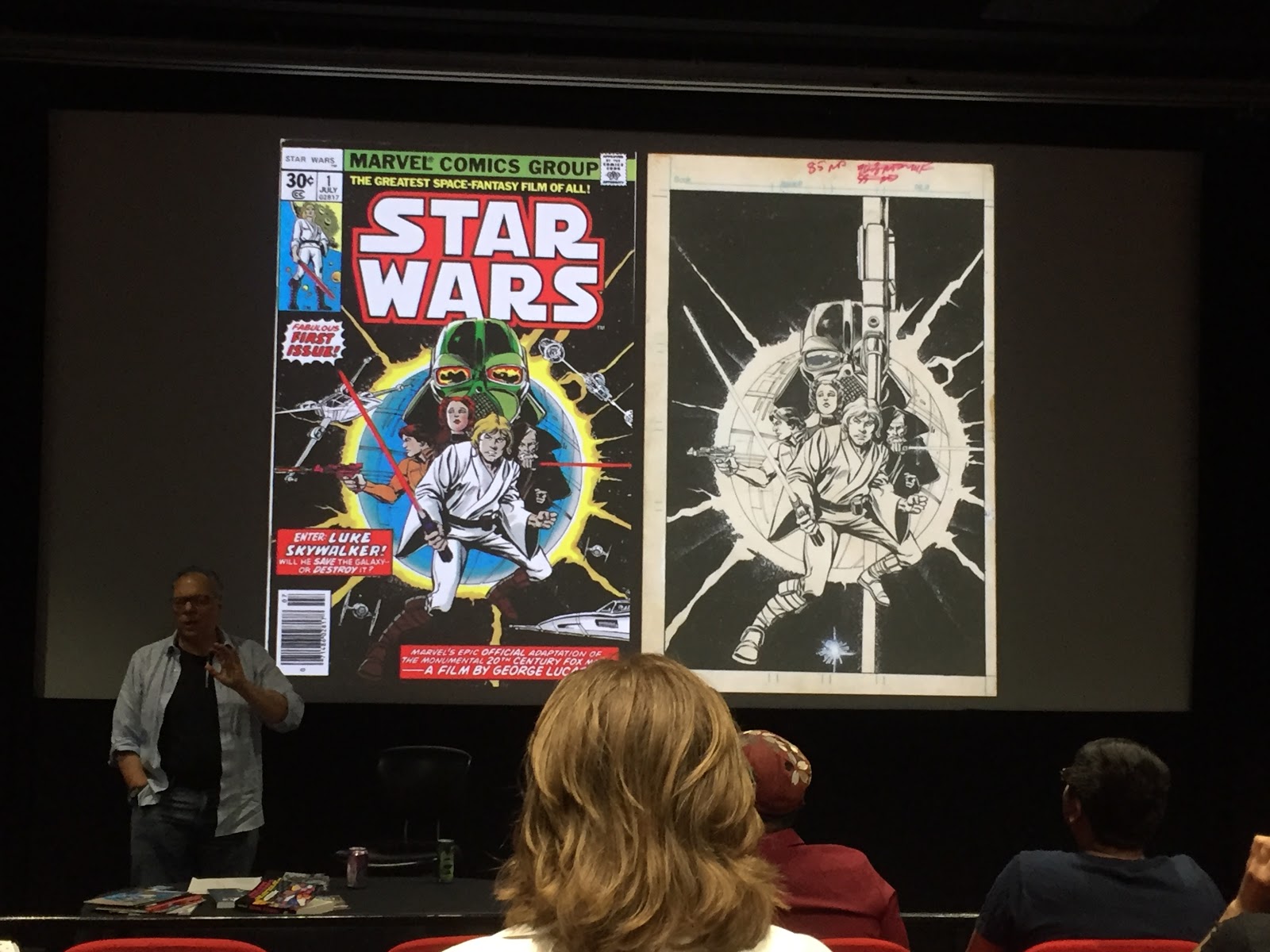
I’ve blogged here before about one of my favorite cartoonists, Howard Chaykin. On September 19, I had the opportunity to see him speak at a class on comics that was open to the public at the Art Center College of Design, a lovely campus nestled in an upscale residential area in Pasadena, CA, next to the Rose Bowl. Chaykin spoke at length about his career and the craft of creating comics.

Known for speaking his mind, Chaykin did not disappoint—but he was also charming, blunt and straightforward about the realities of working professionally in the creative arts/entertainment/comics field, which no doubt was of interest to the students in attendance. (About half the audience were students, the rest fans (and friends) of Chaykin like myself.)

Chaykin is a unique presence in comics because, as he points out, he falls in a gray area of the market that is not mainstream superhero comics per se but not truly alternative either—a trait I feel my work shares as well. He also often likes to claim that he’s never considered himself as naturally talented or technically gifted as many of his peers—as such, to compensate, and the fact that he has to compete against people much younger than himself (during the talk, he often humorously pointed to the students in the audience when making this point), he said he works his ass off and also periodically reinvents himself every few years so as to avoid being typecast or stale.

As a result, Chaykin has enjoyed a diverse, steady career and living—47 years, including a 15-year detour into television, which he said provided him with the financial safety net to work in comics. He mentioned that he was happy with where he was at this stage in his career because he gets to work on his own projects that have meaning for him.

While the event focused initially on some of his more iconic work, such as American Flagg!, Chaykin made clear that he was equally proud of his current work; the presentation did eventually turn into an overview of his career from Star Wars (work he doesn’t feel highly about, noting that it was released just a little before the royalty system at Marvel Comics was established, which he estimates could have netted $3–4 million) to Flagg, Time Squared (which he referred to as his favorite, most personal work), Black Kiss, to his more current work, including Divided States of Hysteria and Hey, Kids! Comics!

When Chaykin also touched on the subject of comics craft and storytelling, he was very thoughtful and insightful. He talked about his love of graphic design and patterns (which is indeed one of his great distinctive strengths), noting at one point how small panels often served as an exclamation point to stop the reader in their tracks. He also spoke about some of the innovations he introduced to the “language” of comics, which he believes he hasn’t always been given full credit for, which I believe is an accurate assessment. While I don’t entirely agree with his assertion that most comics readers are unaware of his work, Chaykin in many ways is indeed a classic “artist’s artists” who has influenced many of the cartoonists who have followed.

His talk was followed by an extensive Q&A. Afterwards, I had him kindly sign a Flagg trade paperback collection I had brought along for that purpose. I reminded him that I had recently done a Rob Hanes Adventures cover that was inspired by the first issue of Flagg (which he saw on Facebook) and we had been introduced years ago by a mutual friend—he was kind to say he did remember me. When I said I was sure everyone knew the inspiration for my cover, he responded with a sardonic chuckle, "Were you listening to my talk?", referring to the lack of awareness most mainstream comics fans have for his work.

Below are additional photos from the event.


Wednesday, November 15, 2017

My New iMac!

Got a new iMac, though not under the most ideal circumstances—a few weeks back, my 2009 iMac crashed and would not start. Worse, I was several pages deep into the next issue of Rob Hanes Adventures and lost all the work. (Yes, I back up my files—in fact, multiple backups as a failsafe—but for some reason had not done so the previous weeks and did not do so for this newest issue (aside from the cover, thank goodness. All it would have required is just dragging/copying the file onto one of my external backup drives. Sigh.)

I took the machine to a Mac repair shop which told me that if the hard drive had indeed failed, it would cost about $400 for a new drive and anywhere from $250-450 to recover the data (if recoverable). Given the computer was purchased in 2009, I opted to purchase a new one; so the repair shop then got to work on recovering the contents of the failed drive. A few days later, I learned that they had actually recovered the main folders I needed – but after the data was transferred to my new computer, I immediately checked the drive while still in the shop and sadly discovered that the specific folders containing the newest issues were missing. Otherwise, I’d say about about 90% of my data was recovered—but, as I said, most of this older data had already been backed up.

The failed drive, removed from the iMac shell
I had been thinking about purchasing a new computer for the past year or so anyway, but since my iMac was customized exactly the way I needed it—complete with Parallels Desktop to run Windows XP in the background so that I could access a large-size scanner that only worked with Windows and to run CorelDraw, a graphic design application I use to letter my comics—I was in no rush to reinvent the wheel by having to reconfigure a whole new computer.

Once I decided to get a new iMac, I moved quickly—one evening, I ran down to a local Best Buy but learned they were out of the model I wanted. I'm equi-distant between two Best Buys and, after checking their stock in the system, the salesperson told me that the other Best Buy had several in stock. But of course when I went to the second store, I found out this was not the case. (I’m glad I declined the first store’s offer to purchase it before I went there!) So I simply went home, ordered it online from Apple and paid $20 extra to have it delivered to me the next day. (I opted against going to a local Apple store because 1) the three stores I know of aren’t super close to to me and 2) I didn’t relish the idea of having to lug the new computer through a mall and parking lot. (BTW, I sadly dropped off the old iMac at a recycling facility for hazardous waste—but have the old hard drive, along with some other older ones, stored at home to protect the data.)

I forgot how fairly easy and straightforward it is to set up a computer today—the old days required a lot of cables and configuration. Here I just plugged it in, turned it on, and it was ready to go—though of course I had to install and configure software.

My biggest concern were my graphics packages, including Adobe Creative Suite (Photoshop, Illustrator, InDesign and Dreamweaver), which have since moved to a monthly online subscription model. I was happily surprised to discover that not only did I find the original installation files saved on my backup drive but, perhaps more importantly, found that I had the wherewithal several years ago to save the serial number needed to activate the installation! Once I found these pieces, I was able to re-install the entire suite and discover it worked in the new operating system! Whew!

What also saved my bacon were the workarounds I found for the scanner and CorelDraw. For years, I had searched online in vain for Mac drivers for my scanner, but in a search just prior to purchasing the new computer, I discovered a third-party developer that offered a Mac driver for the scanner! What another relief.

As to CorelDraw, Adobe Illustrator has always been the most comparable application—in fact, Illustrator is the de facto standard among many graphic design professionals. Though I have always used Illustrator to some degree and was fairly familiar with it, I have always found CorelDraw to be a little more flexible and more compatible with my needs. But beggars can’t be choosers—so even though I still search for a way to run CorelDraw on my iMac (short of having to re-install Parallels Desktop along with a Windows operating system), I’m making do and have become resigned to getting along with Illustrator (for now).

So, aside from the disheartening experience of having lost those early pages (which I had to re-construct from memory), I’m back on track with the next issue of Rob Hanes Adventures!


BELOW: Page 1 from ROB HANES ADVENTURES #19 (without lettering) — one of five pages I had to re-create when I lost the original files when my computer crashed.

Wednesday, September 23, 2009

My Original Art Collection

As a cartoonist, I love looking at original comic book and comic strip art. In addition to finding them personally energizing, seeing the originals—complete with the actual brushstrokes, penlines and whiteout corrections—gives you a sense of the artist's working methods and thought process. For these reasons, I love visiting comic art exhibitions and museums whenever possible (I try to visit the Cartoon Art Museum in San Francisco whenever I'm in Northern California).

Since many pieces of original art I'd love to own are usually out of my price range, I've never been a major collector of original comic strip/comic book art. Nevertheless, I do own a few original pieces that I thought would be fun to share. (What particularly brought these to mind recently is the fact that I've begun framing and matting the pieces.*)

Though my small collection has admittedly been driven mostly by affordability, of course, I also keep an eye out for work by artists I know and admire, and for pieces I find appealing personally.

My first major acquisition were several original pieces by cartoonist Howard Chaykin that I purchased in 1991. This included two pages from his 1987 Blackhawk mini-series from DC Comics; below is a piece that I was particularly thrilled to score, which was used on the back cover for one of the issues, as well as within the main story (click on any of the images that follow to see them larger and in more detail):

Below is a another Chaykin piece purchased at the same time—I believe it's the original blueline art from a Nick Fury mini-series. Consisting of a black acetate overlay over a backing board on which the original colors are applied, this is the art that is shot and from which the colored printing plates are made:


One of my most personally prized pieces is the 1976 Johnny Hazard daily strip below by Frank Robbins, which I purchased from a dealer at the 2005 San Diego Comic-Con for a surprisingly affordable price—well under $100! (Hazard ran from 1944 to 1977.) Though Robbins is not as well remembered today, he was a disciple of the Caniff/Sickles school of cartooning—but as one can see in the piece below, despite following in their footsteps, he was an immensely naturally gifted artist in his own right, who developed a unique and distinctive style of his own. This piece hangs proudly in the main entryway of my home. You can also see a photo of it framed at the top of this blog.


Over the years, I've had the privilege to become friends with several fellow cartoonists. One is Mike Vozburg, who is not also a terrific cartoonist, but a real student of the history of comics—I've spent time with Mike talking about cartoonists we both like, and I've enjoyed his anecdotes about working in the industry.

One day while visiting his home, Mike generously gave me some original pieces as gifts. Below is one nice representative pieces from his run on American Flagg!:


Around 2002 or 2003 (still trying to track down the correct year!), I purchased the following two pieces from artist Mike Royer at the San Diego Comic-Con. Royer is considered by some to be the best inker that late comic-book legend Jack Kirby ever had. When I met him, Royer had been working for many years for Disney's licensing division, and he was at the show selling some of his original concept pieces. The pieces below are hung in our hallway, appropriately leading to our residence's bedrooms.


Finally, I thought I'd throw in for your enjoyment the piece below—even my wife has picked up the occasional work of original art! This is a piece she purchased from an Archie artist (I believe my wife had it signed by the artist, Don Parent). Somewhere in my collection, I also have a Robin (from Batman and Robin) page purchased by my wife, since he is one of her favorite characters.


In the future, I hope to show off more of my other pieces. I also have a nice collection of movie/promotional posters that I'll likely share at some point here as well!

* While framing and matting can be quite expensive, I just recently discovered that if you buy an off-the-shelf frame that can hold a mat, the price of the mat itself is actually quite affordable, usually under $20—it is the custom-sized frame (and glass) that can make the purchase price quite expensive, usually more than $150-200!!

Sunday, February 8, 2009

SHOP TALK: My New Graphics Tablet!

As mentioned in a previous post, I recently upgraded my home computer system from a 10-year-old Win98 PC to a new 20" iMac. The transition has been amazingly easy, especially when one considers that I have Windows XP running within the Mac operating system so that I could continue using some old Windows software and hardware on the new computer that either don't exist for the Mac or would be a waste of money to re-purchase a Mac version.

The only piece of equipment I had to replace as a result of this transition was a graphics tablet—replacing a 4"x5" Aiptek HyperPen 5000 drawing tablet that I've also had for about 10 years but which featured an obsolete PC serial connection. Being the model of thrift I am, I initially had planned to purchase a small Wacom Bamboo drawing tablet, priced under $100 (Wacom is the gold standard for computer graphics tablets).

Fortunately, before I made the purchase, after doing a little research and scrutinizing more closely the tablet's specs, I realized the tablet, while within my price range (under $100) was, with its 5.8"x3.7" active drawing space, smaller than even my old tablet and probably way too small for my needs, especially given the fact that I now have a wider-screen monitor. I then looked at the medium-sized Wacom Bamboo, which with a 8.5"x5.3" live area seemed a bit more suitable. But priced at $199, I must admit it was a bit steep.

I conducted additional research (thank goodness for Google!), and began to focus on the Genius G-Pen F610 tablet. Not only did the tablet feature a much roomier 6"x10" live drawing area, it was also priced just under $100 on Amazon! There were some negative user reviews of the tablet, but fortunately I've learned to sometimes take such comments with a grain of salt, especially when taken as a whole with other comments and reviews. What also finally drove my decision was the realization that the Wacom tablet that actually was more comparable to the F610 wasn't the medium-sized Wacom Bamboo, but the Wacom Intuos3, which sold for $299! Given this, I thought it worth it to take the risk with the G-Pen.

I've been delighted by the results—the tablet works perfectly with both my Mac and Windows graphics programs. Admittedly, I've never needed to use a drawing tablet to its fullest capability. I primarily have used the tablet for coloring, which does not require the kind of finesse that drawing does. (For a good example of what can be accomplished with a drawing pad, check out the work of Benton Jew, who did the cover of issue 12 of Rob Hanes Adventures. Benton now works exclusively on a tablet, no more pen and ink for him!)

However, now that I'm using it, I cancertainly see that the larger tablet is much more conducive to drawing. Up until now, I primarily limited my tablet "drawing" with minor digital touch ups on my art after it had been scanned in. With the larger, roomier drawing space, I can project myself using the drawing function a little more, though at this point not exclusively.

Initially, when I first connected the tablet, I did experience a "lag" with the pen, which some user reviews had complained about. In fact, the pen dragged quite significantly, usually causing a very ragged line very different than what I had drawn. The instruction manual also was very minimal and useless, which others had noted. You can imagine I was aghast at this development.

Fortunately, I had the presence of mind to do some research and though the company that makes the tablet surprisingly doesn't have the most visible website, I eventually tracked down a version of the tablet's driver that was more recent than what shipped with the tablet, and that immediately solved the problem! (I ended up posting a review of the product at the Amazon website, partly to let Mac users know about the newer driver.)

So my new system is now fully decked out for me to do post work on my comics pages!

Tuesday, October 24, 2006

Trudeau Interview


The Washington Post Magazine has posted a lengthy and fascinating article about Doonesbury cartoonist Garry Trudeau at its website here (Or click on the image above).

The jumping off point for the article is the resurgence and attention the strip has experienced with the grave battle injury that one of the central characters, B.D., received while serving with the National Guard in Iraq. In the process, Trudeau--well known for his liberal/anti-Vietnam War/anti-establishment bent--has found an appreciative audience among the military and veteran groups.

I was not aware of this, but Trudeau is generally media and publicity averse, and this is the first major personal piece about him in decades. The article is quite "up close and personal," and illuminating. Read the article and find out about his "bad movie nights" with buddies; his illustrious family history; his appreciation for great cartoonists like Walt Kelly; his love of the Yankees; and his family. It's a great, comprehensive read. Not sure how long the story will be posted, so enjoy it now!