Pages

Showing posts with label WCG Comics website. Show all posts

Saturday, April 18, 2026

Web Tweaks 2026

Yesterday, on April 17, I deployed the re-designed and updated the WCG Comics website!

When it comes to my website, I am an inveterate tinkerer. Though not an expert by any means, I enjoy the process of building and coding web pages. In 1998, I started with html, moved to CSS in 2009, and Wordpress in 2022. These updates have included re-designs, moving to different web hosts, and migrating from PayPal to WooCommerce and Square as my payment processor.

While my website has always met my needs functionally—the main goal being the ability to make the purchase process at my webstore as smooth and painless as possible for users—a major goal in my bucket list has been to move to a more modern fluid and responsive full-width website design. Not only was my current website—using a template called MH Themes—somewhat outmoded because it was an older design, I did not have access to some recent Wordpress features.

Above: Recently retired WCG Comics website.
Over the past several months, I intermittently experimented and played with a variety of designs and themes. None seemed to adequately meet my needs—existing templates seemed too rigid and unsuited for what I wanted.

I realized that another daunting aspect of a potential re-design would be the need to re-create and migrate all my existing sales and products, images, and other features I’d incorporated over the years. Indeed, it was enough to make me believe that such a re-design was unfeasible and daunting to rebuild the website again from the ground up.

A major breakthrough was coming across the Staging feature in Wordpress, that allows a user to duplicate an existing website into a walled off sandbox and play with it without risk of breaking the original site. Just as importantly, when it’s ready, staging also allows you to deploy the website by simply writing over and replacing the existing website to make the new site live.

I also came across a theme that I thought might work for me—NewSpare by AF Themes. Though similar to the MH Magazine theme in that it’s a news site at its heart, it had a full-width design with a top banner image that gave me access to more modern features. While I still had to re-build (or rather, re-create) the front page from scratch, and ensure the webstore pages worked properly, the rest of my content otherwise transferred fairly smoothly into the new format. I still need to slightly tweak the containers of the other pages to ensure they do not run to the very edge, but fortunately, these are mostly cosmetic changes since the pages otherwise retained their layout and content, and were already fully functional and readable. Because of all this, what I thought might take me months was completed over a a few nights!

While I’ve learned to never say never when it comes to my website, hopefully this recent leap will be the last major re-design or update to the website I’ll need to make for awhile!

Below: The website from May 2024. 


Friday, September 5, 2025

Migration to New Web Host


A few weeks back, I received a reminder from my web host provider for my wcgcomics.com website that my three-year hosting package was up for renewal in mid-September. Although the previous two three-year terms, starting in 2019, were approximately $98 for three years, I was shocked to learn that the renewal cost for another three years was nearly $400!

After researching options, I decided on Bluehost, a well established and reviewed web host company. My only concern was the amount of work and level of technical ability that would be required. While I consider myself moderately web-savvy, and had changed hosts before, this was my first time doing so with a WordPress (WP) site. While WP made site management and updates simpler in many ways, migrating was a little more complex than simply copying and moving files from one account to another, because WP is a more complex beast. Beneath the hood, WP is a complex engine involving nameservers, databases, DNS and A records (the latter of which I still don't understand). These all have to be correctly configured to ensure that when someone types in the specific URL for a domain, the internet correctly points the user's browser to the correct IP address for the website.

Thanks to the time I transitioned to WP in 2022, I was somewhat experienced backing up and re-installing a WP website (using a plug-in called Duplicator). In this sense, transferring and re-deploying the files to another web hosting service wasn't too much of a leap, nor was simply re-directing my domain name to my Bluehost site either. But making all the other little changes beneath the hood—as well as migrating my domain name email accounts—seemed daunting. (I am sure web host providers rely on people choosing the least path of resistance by simply paying the higher renewal fee than going through the hassle and stress of such a migration.)

Fortunately, saving some bucks is a great motivator. It helped that Bluehost had solid 24/7 chat support which I took full advantage of—while everyone who assisted me was competent and patient, I did sometimes feel like they were not understanding my questions or adequately responding to me in layman's terms. It also helped that there is a consistency in the platforms' administrator pages, particularly in the same use of the cPanel to manage the account and websites. 

In the end, after doing everything I needed to do on my end based on their guidance, I had to make a leap of faith and accept a certain level of uncertainty on my part, and put my complete trust in them. In this regard, they were actually fairly reassuring, and I drew some comfort from the fact that they no doubt did this almost daily. Since I had already installed and deployed the site several times and had all the backups, I figured that if worse came to worst, I could still go back to my original web host provider or start again from scratch.

That all said, once I made the leap and pointed my domain name to the new web host, of course everything went relatively smoothly and quickly.

Migrating my email also turned out to be fairly simple and smooth. Many years ago, I had fortunately set up all emails sent to my domain name accounts (i.e., emails with the wcgcomics.com extension) to not reside on the server but to forward to a private shadow gmail account where I actually managed the emails within a single account (the account is also configured to allow me to send and respond to messages under my wcgcomics.com email accounts). So though any mail sent to me during the brief transition may have been lost or bounced back to the sender, once I created and configured the same accounts in Bluehost, they automatically re-sync'd to the master gmail account. So, yay! In fact, the change also gave me the opportunity to clean up and streamline the way the accounts are configured.

So, bottom line, though the process was a bit stressful, all turned out well and, all things considered, in retrospect it was not quite as onerous or time consuming as I had anticipated. Indeed, the entire episode turned out to be a good learning experience because the process has now been demystified. I should note that, for the future, I've gotten into the habit of documenting such projects step-by-step as meticulously as possible.

Monday, August 11, 2025

Business and Website Upgrades


Here is another of my occasional blog posts that documents my business and website processes—in this case, both!

An important obligation of being a business that sells physical goods (in this case, comics) is the need to track inventory. This is particularly needed for tax purposes since businesses are required to report the value of inventory on hand each year ("Cost of Goods" or COG) and, subtracting from the previous year's inventory (taking into account purchases that added to inventory), determine the Cost of Goods sold. As someone with more than a few items—26 individual issues and several trade paperback collections and special editions—this becomes a bit more complicated at scale.

Hypothetically, at minimum, inventory only needs to be taken annually: at the end of the year for the tax reporting requirements described above. But another reason to keep an eye on inventory throughout the year is to ensure that you do not run short of some items, at least if you are keeping them available. (I should add that, for tax purposes, it is always best to keep as little inventory in stock as possible in order to minimize tax liability since that inventory is counted as a saleable asset.)

ExpressInvoice logo
In recent years I've used both invoicing software and  separate inventory software to track sales, customers, product information, inventory, etc. Invoicing software also helps to calculate sales tax when applicable on invoices and sales, and at the end of the year, producing reports that total sales, tax and shipping fees collected, etc., for tax purposes. The invoices also serve as sales receipts for customers who have ordered from the WCG Comics website.

I've used a few invoicing and inventory applications over the years. They have become surprisingly pricey—nearly all of them are monthly subscription-based and none seem geared or friendly to very small business users like myself. (In addition, while invoicing and inventory apps often have overlap, they are still two distinct processes that seem to necessitate two separate programs.) I have used two standalone single-purchase software apps for years: ExpressInvoice and Inventoria from NCH Software, which worked in tandem for generating invoices and tracking inventory. They had their quirks and were not perfect but, given the one-time price, they sufficiently met my needs and I was happy with them.

That said, in recent years, these application have been moving towards a more frequent paid licensing update model, with somewhat higher prices, though they were still preferable to subscription based options. However, over the past year, I began encountering problems and receiving error messages because the two applications were not properly connecting or syncing—until recently, after recording a sale with ExpressInvoice, Inventoria would automatically adjust each item's inventory, keeping the inventory levels synchronized on both applications. The applications stopped recognizing each other and, when they did infrequently and seemingly randomly, the inventory levels were off because they had not been syncing regularly. 

After looking for potential alternatives that would not require a subscription (surprisingly, I found none), I decided to look into the capabilities of my current payment processors: WooCommerce and Square.

As I have blogged elsewhere, last year, after migrating my website to WordPress, I shifted from PayPal to WooCommerce, an integrated WordPress plugin, as my online sales processor. And though WooCommerce was the engine driving the process, the Square platform was the actual payment processer behind the scenes. (I already use Square on my mobile device for credit card sales at conventions and signings—that said, I actually only adjusted the settings of the application earlier this year to begin automatically calculating tax and to make sales based on items in the store, versus charging just by amount.)

In any case, though Square and WooCommerce each have built in inventory features, since I already was using ExpressInvoice and Inventoria, I never activated them—until now.

Long story short, with ExpressInvoice and Inventoria becoming less dependable, after some fiddling, I activated and implemented the inventory functions in WooCommerce and Square, and sync'd them. So whenever an online sale is made in WooCommerce, the sale posts on Square and adjusts the inventory accordingly on both platforms.

The only drawback is that Square and WooCommerce feel a bit clunky and inflexible, particularly Square's report functions, which seem less straightforward and user-friendly than those generated by ExpressInvoice and Inventoria. 

Admittedly, ExpressInvoice was somewhat of a redundancy, operating as a shadow system of sales made through WooCommerce and Square—but recording all sales in the app centralized both online and in-person cash sales and inventory tracking into one system. Although Square will now automatically record sales of items made on my website or mobile device, I will still need to enter cash sales after the fact and develop a process and system so that both my sales and inventory are accurately reflected on the platform. 

In any case, though I'm glad to have cut ties with software that were somewhat redundant, at the same time I'll have to develop new workarounds and processes now that I've moved inventory tracking entirely to Square.

Sunday, March 9, 2025

Website Front Page Update


I just implemented a small but significant redesign to the front page of the WCG Comics website! 

Though the design has evolved over the years, a slider with multiple banner images at the top of the site has always been a prominent element  It provided dynamic animation to the landing page and was an efficient way to use the top real estate on the front page for multiple up to date announcements, news, new products, etc.

I've recently looked into updating the site for awhile, to align it more with modern website design principles and trends, particularly in the use of fluid pages with more boxed featured content and bold "hero" images, etc. To date, however, I haven't found a satisfactory WordPress template theme that meets all my needs. (The site currently uses the MH Magazine theme.) 

However, in an effort to move more towards a "content box" design popular in modern website design, I recently replaced the longtime image slider at top with a series of boxed content that takes the same space and fills the same goal as the sliding image by offering multipe important links and messages at the top—but without having to scroll through or wait for a new image to appear. However, in order to retain some dynamic sliding images at the top, the first box—essentially a welcome to the website and the series—features a sliding carousel of images. To offset these smaller images, I also expanded the size of the top banner, making it more of a "hero image."

The new design also fulfills recent changes to promote purchases more by more prominently featuring buy links at the site, making news and other items secondary.

Friday, May 31, 2024

Website Tweaking

As noted in a recent post, I tweaked the WCG Comics website so that users can place orders right from the home page. The landing page immediately highlights the most recent and popular comics for sale, rather than news, announcements and promotion. While that latter content is still there—my website has also always served to document my comics activities—I realized that the sales buttons needed to be front and center.

On top of that, as part of the ongoing need to keep the site compliant with current web standards, I just migrated to a new payment processor. From the very start, I've used PayPal when my website was in simple html and, and later, css format, and have always been happy with it. My main concern has been that some users might believe a PayPal account was required to make a purchase (it isn't). However, PayPal recently began sending me notices that the protocol used at my site was out of date and should be upgraded. Unfortunately, I found the directions and requirements for PayPal's updated integration protocol to be beyond my technical abilities, so began exploring and testing other payment plugins that more seamlessly integrated with my WordPress website. 

Though it took me a little time to understand the whole ecosphere of the e-commerce process, I began by installing WooCommerce, a popular e-commerce plug-in for WordPress that works fairly seamlessly (WooCommerce is owned by the same parent company as WordPress). This turned out to be a no-brainer since WooCommerce works and partners almost universally with all the top payment processors. It was just a matter of determining which one worked best.

I first tried connecting WooCommerce to PayPal since I already had an existing account there, but surprisingly, the same obstacle related to the level of technical proficiency needed still existed, requiring a level of coding I wasn't comfortable with. I then tried WooCommerce's in-house WooPayments—without going too far into the weeds, I surprisingly found the verification process very complicated and frustrating. Though I understand the need to properly verify my business credentials, it seemed unnecessarily long and complicated, particularly given my experience easily getting approval from other processors and doing business online for more than 25 years. With all that—and even after exchanging some emails with the company (there was no chat or telephone option to speak with someone in person)—I felt caught in a loop with nothing to show for it. (To be fair, without going into the minute details, the delay was related to the need for the IRS to properly confirm my business status with paperwork I never needed before and that still needed to be processed.)

Frustrated by an exercise unlike my relatively straightforward and painless experience with other processors, I downloaded a plugin for Square, another prominent payment processor—indeed, I've used Square and have had an account with them for years to make sales at conventions with a credit card reader (and now with my mobile phone as a tap device). In contrast to PayPal and WooPayments, getting verified by Square nearly instantly turned out to be a very simple and straightforward.

So very long story short, after all that and some testing that went smoothly, the migration is done! (I should add that at one point in this process, when I was starting out and playing around, I somehow "broke" my website—fortunately, I had a backup—albeit not a recent one—that I was able to quickly restore. But it taught me a valuable lesson—to use the sandbox accounts I had created to test changes first and to back up my website more regularly!) 

While I don't believe the PayPal protocol was due to be retired or rendered obsolete anytime soon, the new plug-in processes orders all within the WCG Comics website umbrella rather than redirects users  to a third party website (PayPal) to complete a purchase. As a result, the process looks more seamless and professional. It's a change I actually wanted to make for awhile and I'm glad for once I was ahead of the curve in doing so when I had the luxury to figure it all out rather than under the gun because the protocol was being discontinued. 


Thursday, April 11, 2024

Website Update X.0

Though not a major redesign, I just tweaked my website a bit to make it easier to buy my recent comics releases and trade paperbacks right from the front page, with a new header and bold hero image up top—the webstore still has the full catalog.

While I don't consider my skills much beyond an advanced beginner, I'm nevertheless proud of my web design skills that have allowed me to create and maintain my own website. I'm completely self taught and first began playing with html and created my wcgcomics.com website in 1998. In 2009, I rebuilt the site from the ground up in html/CSS format. Then in 2019, I re-designed the website, still using CSS format, and in 2022, migrated the entire site into WordPress, which also made it more mobile-friendly. (After this last transition, I posted a blog with a more comprehensive history of this journey.)

With the recent changes, my goal is to make the sale of my comics the focus of the website, without having to click to a second page to the webstore. The site also serves a promotional site as well as a repository of sorts of my announcements, publishing history, convention appearances and signings, etc. this information is all still there, but slightly less front and center. As for the news and announcements, they're still posted at the website, but of course, only after they've been posted on my various social media accounts. 

Other long term goals in upgrading my website include making it more of an open fluid graphic design and integrating a more modern payment system into my website. As to the former, my website is already fluid and mobile friendly, but my current format still adheres to a classic magazine-style web format—a more dynamic format looks more modern. As to the payment system—while my PayPal program of customized purchase buttons work fine, it's considered outdated integration technology. That said, the new integrated systems have, so far, been a bit beyond my current technological and coding abilities. 

Anway, I would be lying if I didn't admit that I do also enjoy the process of web design and coding. I'm glad I've been able to keep my skills and website fairly current to support my comics publishing and selling.

Saturday, June 18, 2022

WordPress Migration

In addition to my comics work, I’m a bit of a computer geek and, along those lines, one of the skills I’m proudest of is my web capability—launched in 1998, my WCG Comics website initially gave me a simple web presence, then evolved and grew. Not only does it enable me to sell my comics directly to users, it’s also a promotional channel, now supplemented, of course, by my social media accounts and this blog. Also like this blog, it serves as a historical record of my comics work and career, documenting and listing projects and activities like my annual photo galleries and reports of the San Diego Comic-Con, news coverage, interviews and more.

The website began as a simple HTML page in 1998. Then around 2007, I taught myself CSS and upgraded the site to html/css. In 2017, I gave the site a major design overhaul, which I've retained through the present day, also making it more mobile-responsive. This was all made possible with Adobe Dreamweaver—a WYSIWYG and html editor tool that was once an industry standard. Since then, I continued to use Dreamweaver to update manage the website.

As I mentioned in a post earlier this year, I began weaning myself from the Adobe Suite of graphics and design applications, and have already successfully migrated away from Photoshop, Illustrator and InDesign. However, finding a replacement and alternative for Dreamweaver was surprisingly difficult—they just don’t seem to exist. Though I thought I found an acceptable if somewhat clunky alternative in a product called BlueGriffon and even purchased it (fortunately, it wasn't very expensive), it turns out it was discontinued in 2019 and, more significantly, would not work if and when I finally upgraded my Mac OS, which was the primary reason I’ve been migrating away from Adobe. The only viable alternatives appeared to be pure coding editors or applications that only created proprietary website files—applications that would not allow me to simply open or edit my existing html/css files, so I’d have to re-create the site from scratch.


wcgcomics.com in December 2009
That all said, website development and management the last decade or so has moved to web-based CMS (Content Management Systems), the dominant player being WordPress. (I also am familiar with Weebly, where I maintain a personal family website.)

Over the years, I played with WordPress, but always found it  daunting and impenetrable. (I’m self-taught and rely on documentation—e.g., Google and YouTube—when I get stuck or need to learn how to do something.) However, finally faced with a real need to move away from Dreamweaver and html/css completely, I leaned more heavily into learning and understanding WordPress. 

In recent years, I had already taken baby steps in this direction, first creating an account at wordpress.org to "play" in. More recently, when I became a bit more determined, I asked my webhost company to create a subdomain "sandbox" within my website where they installed WordPress, which allowed me to experiment and play more with the system within my account.

After a few breakthrough moments this past week, I finally cracked WordPress. (It sounds simple, but one of the keys was understanding the difference between blog postings and web pages—WordPress was initially created as a blogging tool and remains its default setting).

Once I overcame these humps and cracked the code in my mind, I became proficient enough to begin duplicating my existing website with the help of a template theme that met my needs. After I figured out how to expand WordPress's features with plug-ins and themed templates, I was off and running. Being able to recreate my home page and my webstore—complete with PayPal purchase buttons that worked correctly—was my priority. If I could make those pages functional, the rest was gravy.

So I’m now in the process of building out the rest of the site—being able to cut and paste from the old site to the new, maintaining many of the links and coding in the process—has made it almost a breeze.

As such, I’m now on track to migrate the entire site shortly. It’s way overdue and I’m glad I can finally upgrade to a more up-to-date web-based CMS system that will no longer require me to maintain individual files on my desktop computer.

UPDATE (7/8/22):

As of July 8, 2022,  the new WordPress site became active! While it turned out to be a relatively smooth process, there were nevertheless some bumps along the way...

As I began building out the WordPress site in a subdomain, I spoke with a support person at my webhost service who initially assured me that the company would be able to transfer the new site into my main domain. However, a week later, when I contacted the webhoster again, I was informed that such work was beyond their scope of service(!). They initially provided a link with instructions that were too technical for my skill level. When I subsequently told them that this was beyond my skill level and comfort zone, and confirmed again that they could not do the work, they suggested using a plug-in application made exactly for such migrations called Duplicator that was widely used.

All things considering, the process and the application were relatively fast and simple—fortunately, I found a couple of YouTube videos that walked me through the process that I followed literally step by step. Indeed, to be sure I understood the process, I first deployed the migration into another subdomain that I created specifically for the purpose of testing the installation. I figured that if it was successful, I would then install the main site.

The test was indeed a success so I then proceeded with the installation that would overwrite the existing main domain. However, after I did so, I was unable to read the file to initialize the install of the new files(!). In a panic, I restored the original html files and found the site still worked with the old files. However, after consulting YouTube again, I found a small trick that allowed me to correctly launch the installation—with this adjustment, everything went perfectly smoothly like the earlier test. The new WordPress-powered site was now live—whew!

Below are screenshots of the wcgcomics.com website over the years—courtesy of the Wayback Machine!


October 2000


February 2005


January 2012 – around the time I introduced use of the sliding images


December 2016


April 2017 – this is the layout design I still use for the new
WordPress site.

Thursday, December 10, 2020

Consider the Gift of Comics for the Holidays!

I know it’s been a tough year and hope everyone has been safe and healthy!

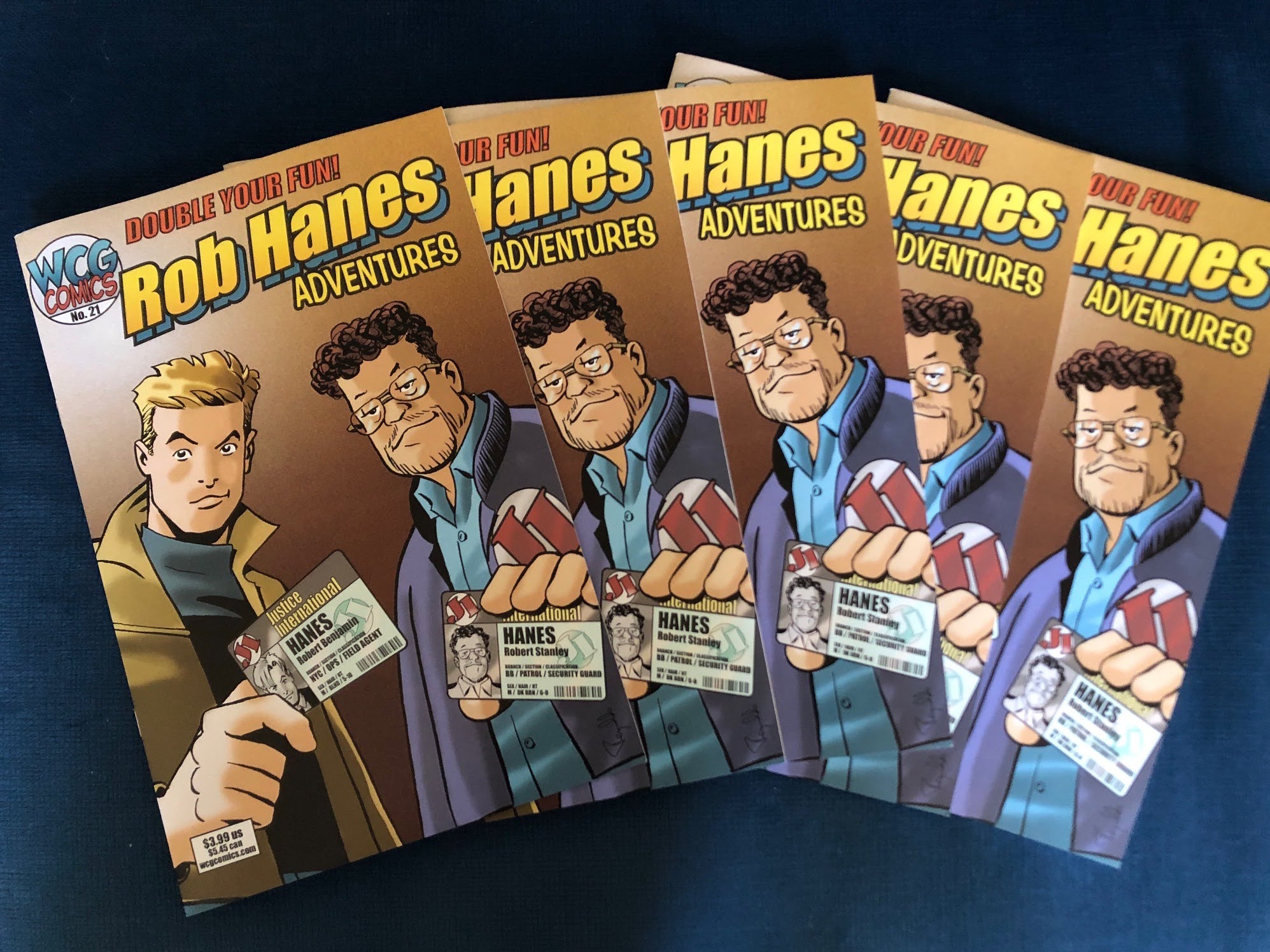
On the comics front, in July, issue 21 of Rob Hanes Adventures was released! Though the in-person San Diego Comic-Con was cancelled, I was fortunate to have a virtual table at this year’s re-imagined online Comic-Con@Home and was pleasantly surprised by the strong sales. Thanks, as always, for everyone’s continued support this past year.

Now is a great time to catch up with the series or consider ordering for a friend as a holiday gift! Visit our webstore to place an order! Issue 21 remains available, as do all back issues—or order one of our trade paperback collections!

And, yes, issue 22 is in the works and promises to be a special treat—Rob goes to France in search of hidden Nazi gold and discovers that one of his forbearers, Sgt. Jim Hanes, played a crucial role in a World War II firefight over the treasure. Read all about it in “Operation Werwolf!”

In the meantime, enjoy the preview art below and best wishes for a happy holiday season and new year!


Saturday, August 8, 2020

Rob Hanes Adventures #21 Now Available!

Fresh from its debut at Comic-Con@Home —the safe-at-home edition of the 2020 San Diego Comic-Con—Rob Hanes Adventures #21 is now available! To purchase, visit our webstore for this and all back issues and trade paperback collections! (Or get the entire series for a great price!) 

In his newest adventure, Rob is dropped inside a foreign enemy state to spirit out of the country a defector and a rogue nuclear scientist. Along the way, he discovers, in a comic case of mistaken identity, that another employee from his espionage and security agency, Justice International, who shares the same name and works as a mall security guard in middle America, has been kidnapped and taken prisoner inside the country, turning Rob's mission into a rescue operation as well! Fans of international intrigue and non-stop action won’t be disappointed! 

I’m also pleased to report that start has begun on issue #22—it’s bound to be a memorable one, reaching back to World War II and featuring characters I created many years ago but am introducing into the “Rob Hanes Universe” for the first time!


Tuesday, July 14, 2020

WCG Comics/Rob Hanes Adventures Comic-Con@Home Exclusives

For additional information, contact Randy Reynaldo at WCG Comics. See below for additional images for promotional use. 

For immediate release

Available at WCG Comics’ virtual booth at the Comic-Con@Home edition of the 2020 San Diego Comic-Con: an advance release of the newest issue of Rob Hanes Adventures, free downloadable comics, trade paperbacks, all back issues, and other merchandise, from 2018 San Diego Comic-Con Inkpot recipient Randy Reynaldo!

Comic-Con may be cancelled but the show goes on—WCG Comics, the publishing imprint for the long-running indie comic-book series, Rob Hanes Adventures, will have a virtual booth at Comic-Con@Home, the virtual edition of the 2020 San Diego Comic-Con, July 22–26, 2020. And no badges needed!

Available at WCG’s "booth" will be the advance release of issue 21 of Rob Hanes Adventures. In this latest issue, after being secretly halo-dropped inside a foreign enemy state to spirit out of the country a defector and rogue nuclear scientist, Rob discovers that, in a comic case of mistaken identity, another employee from his espionage and security agency, Justice International, who has the same name and works as a mall security guard, has been kidnapped and taken prisoner inside the country, turning Rob's mission into a rescue operation as well! Fans of international intrigue and non-stop action won’t be disappointed!

Also available will be all back issues, including trade paperbacks, single issues, downloadable previews, merchandise, and even a FREE downloadable comic-book issue in its entirety for readers to sample the series.

Among the items that will be available:
  • Trade paperbacks collecting the early runs of the series, and two volumes collecting issues 1–4 and 5–8 at special reduced prices!
  • Selected packages to purchase the entire run of Rob Hanes Adventures or the run along with the trade paperback collections of additional material not appearing in the main series.
  • And, of course, all back issues, such as the popular and perennial “Death at Comicon” murder mystery!
  • All orders will receive our usual freebies like bookmarks, pins, and a free back issue!
With Comic-Con open to all this year, now is the time to experience the exhibition hall and panels for the first time and in an all new way!


About the Series
Rob Hanes Adventures is a light-hearted action-adventure series featuring the exploits of a globetrotting private eye and troubleshooter from Justice International who travels the world on assignment, facing adventure, intrigue and romance at every turn, with occasional dashes of good humor and forays into other genres. Every story is self-contained, making it easy for readers to jump in with any issue.

Launched in 1994, the title is one of the longest-running indie comics series. Readers and fans have praised Rob Hanes Adventures for recapturing the spirit of the classic adventure strip and updating it for a modern-day audience.

Series creator-writer-artist Randy Reynaldo was a featured guest at the 2018 San Diego Comic-Con, where he was honored with an Inkpot Award for Achievement in Comic Arts.

For more information about the series, previews and to purchase back issues, visit wcgcomics.com.

Additional information about the series is available at the article, "Twenty Years (and more!) of Rob Hanes Adventures."

# # #


Thursday, December 6, 2018

Consider the Gift of Comics for the Holidays!

As the holidays approach, consider sharing a Rob Hanes Adventures comic-book series collection as a holiday gift for a friend or loved one! Visit our online store for options!

Volumes 0, 1 and 2 are each separately available at a special holiday price of $10.99 (regularly $14.99), collecting the series through issue 8 of the series (volume 0 collects an earlier run of the series). You can also purchase the entire run of the series for as low as $49.99, encompassing two trade paperbacks and 19 full issues!

2018 truly was a banner year for WCG Comics—I was honored to be featured as a Special Guest at the San Diego Comic-Con in July and, to top it off, was surprised with an Inkpot Award for Contributions to Comic Art during my panel!

In addition, at the show, issue 19 of the series was released, featuring a story entitled, “Enemy of the State." In keeping with the often topical nature of the series, Justice International is nationalized by the Federal government as the new investigative arm of a new White House administration, in a story that reflects the country’s current turbulent political climate.

Milestone issue 20 of Rob Hanes Adventures continues the storyline with “Citizen Humbert” that will feature a shock ending, which is targeted for release at the 2019 San Diego Comic-Con. As this suggests, I'm pleased to announce that I'll have a booth at the 2019 show, which promises to be memorable since it marks Comic-Con’s 50th anniversary! More details to come, of course, as we get closer to the event.

Once again, enjoy the happiest of holidays and warmest wishes for a memorable and exciting 2019!


Thursday, August 2, 2018

Now Available for Purchase from our Webstore!

Fresh from their exciting debut at the 2018 San Diego Comic-Con, Rob Hanes Adventures #19 and a new trade paperback, Rob Hanes Adventures, Vol. 2, collecting issues 5-8 of the series, are now available for purchase from WCG Comics!

To order, visit the WCG Comics webstore!

Rob Hanes Adventures #19
Inspired by the era of fake news, the series goes in a startling direction as Justice International is nationalized by the federal government and Rob soon finds himself in the middle of political intrigue as terrorists attempt to detonate a dirty bomb in Europe.
Full color cover • 20 b&w pps • $3.99

Rob Hanes Adventures, Vol 2. 
Squarebound trade paperback collects issues 5–8 of Rob Hanes Adventures
Full color cover • 116 b&w pps • $10.99


Thursday, October 24, 2013

Take a Trip in the Wayback Machine

A few years ago, I stumbled across this amazing resource called the Internet Archive Wayback Machine that appears to archive past versions of websites. As good as I think I’ve been in preserving the history of my comics work, the dynamic quality of the web makes it less easy to do this. So this has been a fun tool for looking back at how my website (and my web design and html/css skills) have evolved over the years.

If you visit the overview of the WCG Comics website here, you’ll find snapshots taken of the website on various dates throughout the year from the year 2000 to the present. I was particularly impressed to see that these are not simply screen images, but the full functional website, live links at all!

Below are some sample pages for the site that you can click through to explore. For an overview of all the available pages from past versions of the website, click here.

From Dec. 2000:
 

From Sept. 2002:

  
From Sept. 2002:


From June 2006:

http://web.archive.org/web/20060607122004/http://www.wcgcomics.com/
For more, visit the Internet Archive Wayback Machine!